<html>
<head>
<meta http-equiv="Content-Type" content="text/html; charset=utf-8">
<title>Cong ty Cong Nghe Tin hoc Nha truong - HƯỚNG DẪN SỬ DỤNG NHANH GEOGEBRA 5.0  Bài 19: Làm việc với hình nón và hình trụ trong Geogebra 5.0 </title>
</head>
<body link="#4D5764" vlink="#4D5764" alink="#4D5764" text="#4D5764">
<center>
<table border="0" cellpadding="0" cellspacing="0" width="600">
<tr>
<td><b><font size="4">Cong ty Cong Nghe Tin hoc Nha truong</font></b></td>
<td align="right"><font size="4"><a href="http://www.schoolnet.vn">http://www.schoolnet.vn</a></font></td>
</tr>
</table>
<hr color="#DC0312" width="600">
<table border="0" cellpadding="0" cellspacing="0" width="600">
<tr>
<td><b><font size="5">HƯỚNG DẪN SỬ DỤNG NHANH GEOGEBRA 5.0  Bài 19: Làm việc với hình nón và hình trụ trong Geogebra 5.0 </font></b><br>
<font size="2">26/02/2014</font><br><br>
<p align="justify"><b><p>Trong bài thực hành này chúng ta sẽ làm quen với các công cụ làm với với hình nón và hình trụ.</p></b><br>
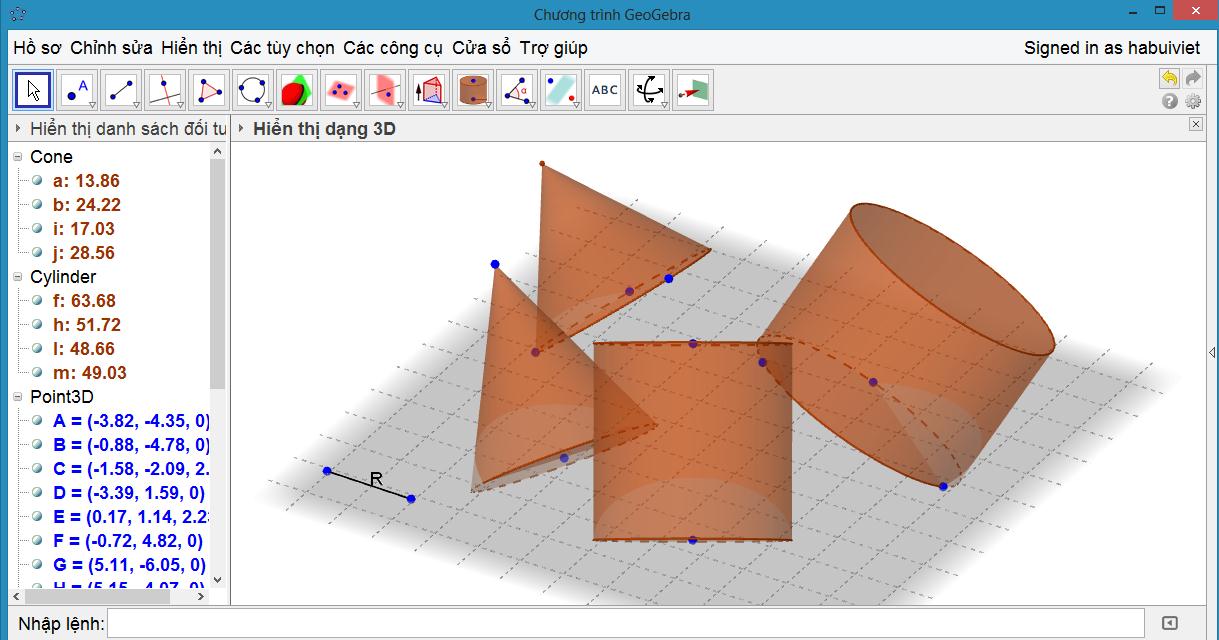
<p>Trong phần mềm Geogebra có 2 công cụ làm việc với hình nón và 2 công cụ làm việc với hình trụ.<br><img src="/images/022014/Geogebra/7509/geogebra.jpg" height="302" width="577"></p><br />
<p>Xem video phần thực hành bài học<p/><br>
<i></i></td>
</tr>
</table>
<hr color="#DC0312" width="600">
<table border="0" cellpadding="0" cellspacing="0" width="600">
<tr>
<td align="center">URL của bài viết này::<a href="http://www.schoolnet.vn/modules.php?name=News&file=article&sid=7509">http://www.schoolnet.vn/modules.php?name=News&amp;file=article&amp;sid=7509</a></td>
</tr>
</table>
<hr color="#4D5764" width="600">
<table border="0" cellpadding="0" cellspacing="0" width="600">
<tr>
<td><font size="2">&copy; </font> <a href="http://www.schoolnet.vn"><font size="2">Cong ty Cong Nghe Tin hoc Nha truong</font></a></td>
<td align="right"><font size="2">contact: </font> <a href="mailto:sales@schoolnet.vn"><font size="2">sales@schoolnet.vn</font></a></td>
</tr>
</table>
</center>
</body>
</html>